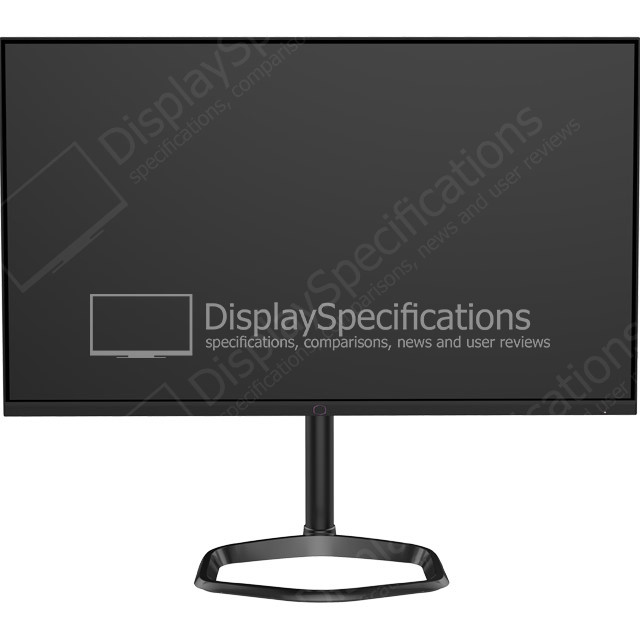
27" Cooler Master GM27-FQS - Specifications
Brand, series, model
Information about the brand, series, model and model aliases.
| Brand Name of the company-manufacturer. | Cooler Master |
| Model Designation of the model. | GM27-FQS |
| Model year The year in which this model was announced. | 2018 |
Display
Information about the main characteristics of the display - panel, backlight, resolution, refresh rate, etc.
| Size class Size class of the display as declared by the manufacturer. Often this is the rounded value of the actual size of the diagonal in inches. | 27 in (inches) |
| Diagonal Approximate diagonal size of the display. If the manufacturer does not provide such information, the diagonal is calculated from the width and height of the screen. | 801 mm (millimeters) 80.1 cm (centimeters) 31.5354 in (inches) 2.628 ft (feet) |
| Width Approximate width of the display. If the manufacturer does not provide such information, the width is calculated from the diagonal and the aspect ratio. | 698.112 mm (millimeters) 69.8112 cm (centimeters) 27.4847 in (inches) 2.2904 ft (feet) |
| Height Approximate height of the display. If the manufacturer does not provide such information, the height is calculated from the diagonal and the aspect ratio. | 393.688 mm (millimeters) 39.3688 cm (centimeters) 15.4995 in (inches) 1.2916 ft (feet) |
| Panel manufacturer Name of the manufacturer of the display panel. | BOE TP Vision |
| Panel model Information about the model of the panel used. | TPT315B5-QHBN0 (TP Vision) |
| Panel type There are various panel technologies. Each has its own specific features - viewing angles, color reproduction, response time, brightness/contrast, production cost, etc. The image quality depends directly on the type of the display panel used. | IPS-ADS |
| Panel bit depth The most widely used panels are those with 6, 8, and 10 bits for each of the RGB components of the pixel. They provide 18-, 24-, and 30-bit color, respectively. | 10 bits (8 bits + FRC) |
| FRC Frame Rate Control (FRC) is a method, which allows the pixels to show more color tones. With quick cyclic switching between different color tones, an illusion for a new intermediate color tone is created. For example, by using FRC, a 6-bit display panel is able to show 16.7 millioin colors, which are typical for 8-bit display panels, and not the standard 262200 colors, instead. There are different FRC algorithms. | Yes |
| Colors The maximum number of colors, which the display is able to reproduce, depends on the type of the panel in use and color enhancing technologies like FRC. | 1073741824 colors 30 bits |
| Aspect ratio The ratio between the horizontal and the vertical side of the display. Some of the standard and widely used aspect ratios are 4:3, 5:4, 16:9 and 16:10. | 1.778:1 16:9 |
| Resolution Information about the number of pixels on the horizontal and vertical side of the screen. A higher resolution allows the display of a more detailed and of higher quality image. | 2560 x 1440 pixels Quad HD (QHD) / 1440p |
| Pixel pitch The pixel pitch shows the distance from the centers of two neighboring pixels. In displays, which have a native resolution (the TFT ones, for example), the pixel pitch depends on the resolution and the size of the screen. | 0.273 mm (millimeters) 0.0273 cm (centimeters) 0.0107 in (inches) 0.0009 ft (feet) |
| Pixel density Information of the number of pixels in a unit of length. With the decrease of the display size and the increase of its resolution, the pixel density increases. | 93 ppi (pixels per inch) 36 ppcm (pixels per centimeter) |
| Backlight The backlight is the source of light of the LCD display panels. The type of backlight determines the image quality and the color space of the display. There are various backlights such as CCFL, LED, WLED, RGB-LED, and etc. | W-LED |
| sRGB sRGB is a color space, developed jointly by Hewlett-Packard and Microsoft in 1996. It is used in different devices such as printers, displays, TV sets, cameras, etc. The sRGB color space covers about 72% of the NTSC color space. | 98 % (percent) |
| Adobe RGB (1998) Adobe RGB (1998) is a color space, developed by Adobe Systems in 1998. It has a wider gamut than the sRGB (mainly in the cyan-green range of colors) and is widely used in professional printing. | 84 % (percent) |
| NTSC (1953) The NTSC (1953) color space is introduced in 1953 by the FCC with the appearance of color television and has a wider gamut than the sRGB. | 88 % (percent) |
| Brightness Information about the brightness of the screen. It is measured in candela per square metre (cd/m²). | 250 cd/m² (candela per square meter) |
| Static contrast The static contrast shows the ratio between the brightest and the darkest color, which the display can reproduce simultaneously, for example, within one and the same frame/scene. | 1200 : 1 |
| Dynamic contrast The dynamic contrast shows the ratio between the brightest and the darkest color, which the display can reproduce over time, for example, in the course of playing a video. | 20000000 : 1 |
| Horizontal viewing angle Information about the maximum horizontal viewing angle, within which the image on the screen is of acceptable quality. | 178 ° (degrees) |
| Vertical viewing angle Information about the maximum vertical viewing angle, within which the image on the screen is of acceptable quality. | 178 ° (degrees) |
| Minimum response time Information about the minimum amount of time, in which the pixels change from one color to another. Very often the manufacturer provides the response time for transition from grey-to-grey (G2G). | 5 ms (milliseconds) 0.0050 s (seconds) |
| Input lag Desktop monitors and smart TVs experience a latency/lag in visualizing the information. The time in milliseconds that the display needs to visualize the signal input. | 5 ms (milliseconds) 0.0050 s (seconds) |
| Coating Information about the type of coating of the display. There are different types of matte and glossy coatings, each of which has its own advantages and drawbacks. | Anti-glare/Matte |
3D
3D displays use various technologies to achieve a 3D effect. Each of these technologies has its own advantages and drawbacks.
| 3D Information on whether 3D is supported or not. | No |
Frequencies
Information about the horizontal and vertical refresh rates/frequencies.
| Horizontal frequency (digital) The horizontal scan rate/frequency shows the number of horizontal lines, displayed by the monitor per second, when it is plugged to a digital source. | 30 kHz - 114 kHz (kilohertz) |
| Vertical frequency (digital) The vertical frequency/refresh rate shows how many times in a second the image on the screen is refreshed. | 48 Hz - 76 Hz (hertz) |
| D-sub - 30 kHz - 90 kHz; 50 Hz - 76 Hz DVI - 30 kHz - 90 kHz; 50 Hz - 76 Hz DisplayPort - 30 kHz - 114 kHz; 48 Hz - 76 Hz HDMI - 30 kHz - 114 kHz; 48 Hz - 76 Hz |
Power supply and consumption
Information about the power supply and consumption, energy efficiency class, etc.
| 110V Permissible voltage tolerance in a 110-volt electric system. | 100 V - 120 V (volts) |
| 220V Permissible voltage tolerance in a 220-volt electric system. | 220 V - 240 V (volts) |
| Alternating current frequency Requirement regarding the alternating current frequency in the electric system. | 50 Hz - 60 Hz (hertz) |
| Electric current (A) Requirement regarding the electric current rating in amperes (A) of the electric system. | 2.25 A (amperes) |
| Power consumption (off) Power consumption in off-mode. | 0.5 W (watts) |
| Power consumption (sleep) Power consumption in sleep/stand by/suspend mode. | 0.5 W (watts) |
| Power consumption (average) Average power consumption in standard work mode. | 46 W (watts) |
| Power consumption (maximum) The maximum possible power consumption. | 57 W (watts) |
| Power consumption (annual) Estimated power consumption per year in kWh. | 67 kWh (kilowatt-hours) |
| Energy efficiency class The energy efficiency class/label provides general idea about the power consumption. There are different energy efficiency classes and each sets its own requirements regarding the power consumption. Some of the existent energy efficiency classes are A+++, A++, A+, A, B, C, D, E, F, G. | B |
Dimensions, weight and color
Information about the dimensions and the weight of the specific model with and without stand as well as the colors, in which it is offered to the market.
| Height Height without stand in different measurement units. | 357 mm (millimeters) 35.7 cm (centimeters) 14.0551 in (inches) 1.1713 ft (feet) |
| Width with stand Width with stand in different measurement units. | 729.6 mm (millimeters) 72.96 cm (centimeters) 28.7244 in (inches) 2.3937 ft (feet) |
| Height with stand Height with stand in different measurement units. | 533 mm (millimeters) 53.3 cm (centimeters) 20.9843 in (inches) 1.7487 ft (feet) |
| Depth with stand Depth with stand in different measurement units. | 153.2 mm (millimeters) 15.32 cm (centimeters) 6.0315 in (inches) 0.5026 ft (feet) |
| Weight with stand Weight with stand in different measurement units. | 7 kg (kilograms) 15.43 lbs (pounds) |
| Box width Width of the package in different measurement units. | 839 mm (millimeters) 83.9 cm (centimeters) 33.0315 in (inches) 2.7526 ft (feet) |
| Box height Height of the package in different measurement units. | 640 mm (millimeters) 64 cm (centimeters) 25.1969 in (inches) 2.0997 ft (feet) |
| Box depth Depth of the package in different measurement units. | 183 mm (millimeters) 18.3 cm (centimeters) 7.2047 in (inches) 0.6004 ft (feet) |
| Box weight Weight of the product with all accessories and packaging in different measurement units. | 10.2 kg (kilograms) 22.49 lbs (pounds) |
| Colors Information about the colors, in which the specific model is offered to the market. | Black White Silver |
Ergonomics
Information about the ergonomic functions - height adjustment, swivel angles, tilt angles, etc.
| VESA mount Information about whether there is a possibility for wall mounting according to the VESA Mounting Interface Standard (MIS). | No |
| Removable stand Information about whether the stand can be dismounted. Usually, this is required for wall mounting. | Yes |
| Height adjustment Information about whether the stand allows height adjustment. | No |
| Landscape/portrait pivot Some displays have the ability to operate in landscape and portrait mode alike. | No |
| Left/right swivel Information whether the display can be swiveled around the stand axis. | No |
| Forward/backward tilt Most displays have the ability to be tilted forward and backward as to provide a more comfortable viewing position for the user. | Yes |
| Forward tilt Maximum degree of forward tilting of the display. | 3.5 ° (degrees) |
| Backward tilt Maximum degree of backward tilting of the display. | 23.5 ° (degrees) |
Camera
Many contemporary desktop monitors and smart TV sets have built-in cameras.
| Camera Information whether the current model has a built-in camera or not. | No |
Connectivity
Available connectivity ports, slots and interfaces.
| Connectivity Information about the available connectivity ports, slots and interfaces such as USB, infrared port, SD card slot, audio/video and network interfaces, etc. | 1 x HDMI 1.4 (MHL) 1 x DisplayPort 1.2 1 x DVI-D Dual Link 1 x D-sub 1 x 3.5 mm Audio Out |
| High-bandwidth Digital Content Protection (HDCP) |
Features
Some additional functional features of the model.
| Features Information about additional software features, technologies, functions and services of the model. | AMD FreeSync technology Flicker-free technology Low Blue Light |
Certificates, standards and licenses
Licenses from regulatory agencies, standards, certificates.
| Certificates, standards and licenses List of the standards, certificates and licenses supported/received by the current model. | CCC CECP CEL1 EAC ENERGY STAR RoHS TCO Certified Displays |
Operating and storage conditions
There are certain requirements for the environmental conditions, in which the display should be used and stored in order to function properly.
| Operating temperature The operating temperature shows the safe temperature range (from minimum to maximum), within which the display will function flawlessly. Outside this range it might operate improperly and/or fail entirely. | 0 °C - 40 °C (degrees Celsius) 32 °F - 104 °F (degrees Fahrenheit) |
| Operating humidity The operating humidity shows the acceptable level of humidity, in which the display will function flawlessly. It sets a lower and an upper humidity level for safe operation and is measured in percentage. | 10 % - 85 % (percent) |
| Operating altitude The operating altitude shows the maximum admissible altitude, at which the display will function flawlessly. Above this level it might not operate properly and/or might seize to function. | 5000 m (meters) 16404.2 ft (feet) |
| Storage temperature The storage temperature shows the range from a minimum to a maximum temperature, within which storing of the display is considered to be safe. | -25 °C - 55 °C (degrees Celsius) -13 °F - 131 °F (degrees Fahrenheit) |
| Storage humidity The storage humidity shows the lower and upper humidity limit, which ensures safe storage of the display. Storing it outside these limits might damage the display. | 5 % - 90 % (percent) |
| Storage altitude The storage altitude shows the maximum possible altitude for secure storing of the display. Storing it above this limit may result in damaging the display. | 12192 m (meters) 40000 ft (feet) |
Accessories
Often the packaging of desktop monitors and smart TV sets includes accessories for them.
| Accessories Information about some of the main accessories included in the standard packaging of the current model. | D-sub cable DisplayPort cable - optional DVI-D cable - optional HDMI cable - optional |
Additional features
Information about other features.
| Additional features Information about other features of the current model, which are important and have to be specified. | Anti-theft stand lock slot - Kensington |